
Table of Contents
Circle is a polished community platform with a clean UI, powerful automation, solid mobile apps, and native live events. The “almost” in “almost does everything” is doing a lot of heavy lifting, though, because transaction fees don’t appear on the pricing page, and the features you really need are locked behind the $199/month plan. Don’t forget email marketing costs extra on top of everything else, and courses still can’t issue certificates without a third-party integration.
Best for: Brand-conscious creators who want a professional-looking community with live events and gamification, and who don’t mind assembling a tool stack to fill the gaps.
Not for: Educators who need structured learning programs with assessments and certificates, creators watching monthly margins, or anyone who thought $89/month was their entire bill.
Rating: 4.8/5

What Makes This Circle Review Different
At GroupApp, we’ve spent the past 8 years working directly with coaches, educators, and creators to build real community businesses. Our mission is to help creators launch, grow, and migrate away from platforms that no longer work for them.
Circle.so is one of those platforms people move to when they’ve outgrown Skool’s one-room structure (read our Skool alternatives article to know more) and want something that looks more premium.
But it’s also the same platform we’ve seen creators leave when transaction fees compound, the email marketing add-on is added to the bill, and missing course assessment tools become a problem they can’t work around.
The data in this review comes from our real-world experience with the platform, and with our clients who decided to jump on board because Circle.so just wasn’t doing it for them anymore.
We even documented a customer story of how Mastermind City tested ‘an enormous amount’ of community software before finding GroupApp to help you relate better.
With our vast experience, we know where Circle excels and where it breaks down, so bear with us.
Let’s get into it.
What Is Circle?

Circle community platform launched in 2020, founded by Sid Yadav, Rudy Santino, and Andrew Guttormsen. These three musketeers were former Teachable employees, and Sid was Teachable’s first designer.
After years of building a course platform, they noticed the gaps that everyone in this space eventually discovers:
- Course platforms are great for content, but they suck at creating connections.
- Online community platforms work well for conversation, but are useless when it comes to structured learning.
Circle.so was built to be the middle child and carry both burdens of the family well.
Then Ankur Nagpal, founder of Teachable, invested roughly 90% of his liquid net worth in Circle. Yes, 90% of everything he owns pushed Circle’s valuation to $200 million and made it one of the fastest-growing community platforms in the creator economy.
Today, Circle is used by some of the biggest names in the creator space, like Jay Shetty’s community, Ali Abdaal’s Part-Time YouTuber Academy, and Pat Flynn.
When platforms get this level of visible endorsement, it’s worth finding out why, and also worth asking whether what works for a million-subscriber creator also works for the 300-member program you’re trying to build.
Circle at a Glance
| Feature | What Circle offers |
| Community | Spaces, space groups, group chat, posts, member directory, rich profiles |
| Courses | Self-paced, structured, and scheduled with drip content, embedded media, and AI transcripts |
| Events & Live | Live rooms (up to 20 participants), live streams (up to 200 viewers on Business plan) |
| Automation | Workflows with triggers and actions, Business plan ($199/mo) only, up to 20 automations |
| Gamification | Points, leaderboards, ranks, and activity scores rolled out in Circle 3.0 (2025) |
| Website Builder | Basic landing page builder with templates, included on all paid plans |
| Email Marketing | Email Hub add-on starts at $0 for under 100 contacts, $99/mo for 10,000 contacts |
| Branding | Custom domain on Professional; remove Circle branding on Business plan only |
| Mobile Apps | iOS and Android apps with in-app purchases and branded notifications available |
| Integrations | 15+ native integrations, including Zapier (14 triggers, 21 actions), WordPress, and Teachable |
Circle.so Review: User Experience
User Experience & Interface 4.5 / 5
The first thing you notice when you log in to Circle is that it looks like a modern SaaS product, with clean lines, intentional whitespace, and left-side navigation that feels like Slack or Notion.

When your members land on a platform that looks polished and professional, they subconsciously raise their estimate of the value of what you’re selling them. Circle nails this from day one.
The good
The interface is clean and intuitive, with navigation on the left, consistently structured so members always know where they are. There’s also a community switcher (similar to Discord) that lets members switch between multiple communities with a single click.
Similarly, keyboard shortcuts work across the platform, so moving between sections is smooth and lag-free.
The catch
Some important tools are buried in a dropdown menu that’s easy to overlook. Your workflows, moderation settings, and theme customization all live in a secondary menu that isn’t immediately visible. It’s a small UX inconsistency that doesn’t break the platform, but it does slow down your first week of admin setup.
What this means for your business
A polished interface means lower member dropout during onboarding because the first 48 hours after a member joins are the most critical for retention, so a confusing interface kills momentum before it builds. Circle removes that friction. The hidden admin tools are your problem, not your members’ problem, so the trade-off is survivable.
The Mobile App
Circle has both iOS and Android apps that mirror the full platform experience. Members can post, join events, take courses, chat, and receive push notifications, all from their phones.
That last part matters more than people realize because, according to Statista, over 60% of global internet traffic now comes from mobile devices, so a community app with poor mobile functionality loses members before habits form.
Moreover, push notifications through Circle’s mobile app consistently outperform email for open rates. When you go live, members get notified the same way they do when a friend texts them, which email can’t replace.
Here’s a verified Capterra reviewer describing Circle’s clean, modern UI and seamless navigation:

Circle.so Review: Community Building
Community Building Tools 4.7 / 5
If the one thing you want to do is build a rich, organized, professional community experience, and do it well, Circle is one of the best tools in the market. The Spaces architecture is smart, the chat functionality is genuine, and the content editor is miles ahead of most competitors.
Spaces and Space Groups: The Architecture That Makes Circle Flexible
Circle organizes everything around Spaces, kind of like individual rooms inside your community, each with its own type, access level, and purpose.
With Circle, you can create:
- Posts spaces for forum-style discussions, announcements, and long-form content
- Events spaces for live sessions, webinars, and calendar management
- Chat spaces for real-time messaging and ongoing conversations
- Course spaces for structured learning content
- Members spaces for the member directory

Furthermore, you can set each space to Public (anyone can see it), Private (only invited members can see it), or Secret (hidden from non-members). Such access control lets you build tiered membership experiences where free members can access public spaces, while paying members unlock private spaces.
On the other hand, Space Groups let you bundle related spaces into categories in your community sidebar. For example, a coaching community might have a “Welcome Zone” group, a “Weekly Coaching Calls” group, and a “Resources” group, each containing the relevant spaces for that theme.
The good
The Spaces architecture is one of the most flexible community organization systems available, with multiple space types, granular access control, and Space Groups for visual organization. This means you can build a sophisticated member experience without technical skills. The chat spaces in particular are Slack-quality, with threaded replies, voice messages, GIFs, emoji reactions, and live member presence indicators.
The catch
You’re capped at 20 spaces on the Professional plan ($89/mo) and 30 on Business ($199/mo). If you’re a growing community with multiple programs, cohort tracks, and tier levels, you’ll hit that cap faster than you expect, and adding more spaces costs money on top of your plan.
What this means for your business
A well-organized community with clear spaces reduces your support load significantly because members who know where to find things ask fewer questions and stay longer. But if your community model requires 25+ spaces (multiple courses, tiers, and discussion categories), you need to budget for a Business plan from day one.
Content Creation: The Editor That Makes Other Platforms Look Basic
Circle’s post editor uses a “/” command structure (similar to Notion) that lets you insert any content type inline: headings, videos (uploaded directly or embedded from YouTube, Vimeo, Loom, Wistia), code blocks, images, PDFs, audio files, spreadsheets, forms, and surveys.

For context: Kajabi’s community editor doesn’t support headings, blockquotes, or inline video embeds from external platforms, as explained in our detailed Kajabi review. Circle’s editor, however, makes Kajabi’s look like a basic notepad, and that gap makes a lot of sense for creators who post long-form content, tutorials, or research inside their communities.
Read this review from a mental health coach praising Circle’s course management and daily member interaction tools:

Circle.so Review: Online Course Creation
Online Course Creation 3.5 / 5
Here’s where Circle’s Teachable DNA shows, and also where you’ll find its current limits.
The platform was built with online learning in mind, with a clean course structure, flexible content formatting, and three course types that give you real options. However, the gaps in assessment and certification tools are real constraints for anyone building a serious learning program.
Three Course Types That Cover Most Use Cases
Circle organizes courses into three models:
- Self-paced: Students access all content immediately on enrollment. Good for evergreen programs where learners set their own pace.
- Structured: Sections are released gradually based on students’ enrollment dates. Good for cohort programs that follow a weekly curriculum.
- Scheduled: Content releases on specific calendar dates, simultaneously for all students, which is ideal for cohort programs with a fixed start date.

Each course is built with Sections (modules) and Lessons. Plus, the content editor within lessons uses the same Notion-style “/” command as the rest of Circle, so you can include video, audio, PDFs, code, forms, and more, all embedded natively or pulled from 700+ supported platforms.
The good
The course builder is easy to use and more flexible than most community platform course tools. What’s more, content uploads are reliable and automated AI video transcripts (available on the Business plan) make video content searchable, which improves both accessibility and discoverability. Finally, the drip scheduling based on enrollment date works exactly as expected.
The catch
Circle lacks native quizzes, graded assessments, course completion certificates, and is haunted by limited individual student progress analytics. While you can see whether someone completed a lesson, you can’t see how long they spent on it, how they scored on assessments (because there are no assessments), or whether they actually understood it. To top it all off, certificates require a third-party integration (Accredible via Zapier), which is both complex and expensive in the long run.
What this means for your business
Circle’s course builder is sufficient if you’re a creator running a coaching business where video content supplements live calls. But if you’re an educator running professional development, certification programs, or any program where your students’ results are your marketing, Circle leaves a real gap. And that gap affects both your product quality and your renewal rates.
To show you what structured learning with real assessment and progress tracking looks like, read our case study of how Moe Foundation trained 1,500 coaches worldwide with structured learning.
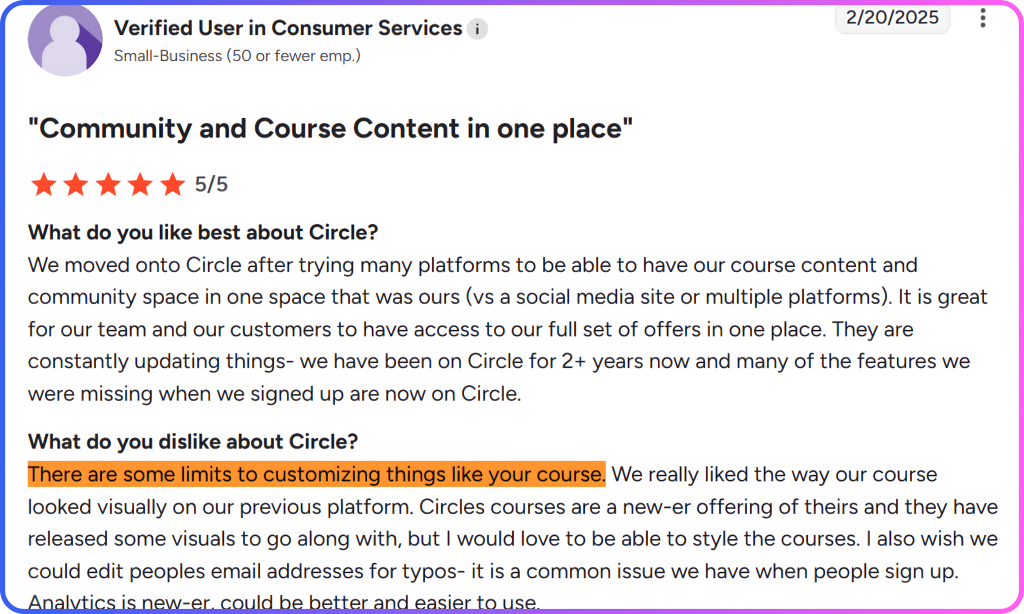
Check out how this reviewer notes Circle’s course builder lacks advanced customization and visual design flexibility compared to dedicated course platforms.
Circle.so Review: Events and Live Streaming
Events & Live Streaming 4.0 / 5
Circle offers two distinct live formats that serve different purposes, and you need to understand the differences before you commit, especially if you run regular community calls, workshops, or webinars.
Live Rooms vs Live Streams: Two Different Tools
Live rooms are interactive sessions where participants can join with a camera and a microphone, and they support up to 15 participants on Professional and 20 on Business. These are ideal for coaching calls, small-group workshops, mastermind sessions, and Q&As where two-way participation is the focus.
Meanwhile, live streams are one-to-many broadcasts where up to 100 viewers watch on Professional, or up to 200 on Business. Here, only hosts and co-hosts can use video and audio, but attendees can participate via chat or request to come on stage. These work well for webinars, announcements, masterclasses, and large-scale community events.

The good
Events live natively inside the community, so you don’t need a separate Zoom link to share, a calendar invite to manage, or a separate reminder sequence to build. Instead, members RSVP directly in the platform and get automatic notifications. You can also record inside the platform and share the files as community posts or repurpose them as course lessons.
The catch
The Live Room limit of 20 participants on the Business plan is too low for creators running group programs. This makes large-scale webinars or community-wide events a workaround situation unless you’re on Circle Plus (custom pricing). Plus, the mobile live-streaming experience has received mixed reviews, with some users reporting lag and preferring Zoom for important sessions.
What this means for your business
Circle’s Live Rooms are sufficient for a creator running weekly small-group coaching calls (under 20 people), and the built-in recording and repurposing workflow saves real admin time. Even so, you’ll need to use Circle’s Zoom integration if you run monthly community-wide events, larger workshops, or any live session with more than 20 interactive participants. This reintroduces the tool-switching friction that Circle was supposed to eliminate in the first place.
Here’s a screenshot of a user reviewing Circle’s native livestreaming and private groups, all managed from inside the community:

Circle.so Review: Automation and Workflows
Automation & Workflows 4.0 / 5
This rating requires the $199/month Business plan because the Professional ($89/mo) plan offers no automation workflows.
If you’ve ever used Zapier and thought, “I wish this were built directly into my community platform,” Circle’s workflow feature is basically that. And it’s impressive when you can access it.
Three Workflow Types That Cover the Full Community Lifecycle
- Automation Workflows: trigger-based automations that run when something happens (member joins, course completed, payment received, event RSVP). The classic event-driven automation.
- Bulk Action Workflows: apply an action to a filtered segment of members immediately. Send a message to everyone who enrolled more than 30 days ago and hasn’t logged in. Tag everyone who completed Module 3.
- Scheduled Workflows: bulk actions that run on a recurring schedule. Every Monday, send a weekly digest to members who haven’t visited in 7 days.
Circle ships 15+ pre-built workflow templates that you can clone and customize.

For example, you can
- Welcome new members with a personalized message and add them to the relevant spaces.
- Send a nudge when someone RSVPs for an event but doesn’t show up.
- Add a tag when a member completes a course.
- Remove access when a subscription lapses.
The good
Circle’s automation is powerful and solves real operational problems. In fact, automating member onboarding alone can save 2–5 hours per week in a community with regular new-member intake. Similarly, the bulk action feature is particularly useful for re-engagement campaigns, including identifying inactive members, sending targeted messages, and tagging those who respond for follow-up.
The catch
Automation workflows are only available on the Business plan at $199/month, which is the most significant feature gate in Circle’s pricing structure. If you buy Professional at $89/month because automation sounds optional, and then realize six months in that manual onboarding is eating your time, you’re looking at a $1,320/year jump in your platform cost.
What this means for your business
You should decide which Circle plan to start on based on automation. If you’re running a community with any meaningful member volume, say, 50+ new members per month, manual onboarding is not a sustainable operation. In that case, starting on Business is probably the right call. Starting on Professional and expecting to add automation later is a cost planning error that catches many creators off guard.
Here’s a statement from a user who discovered that Circle’s advertised workflow automations require upgrading to the Business plan at $199/month:

Circle.so Review: Gamification
Gamification 3.8 / 5
Gamification was Circle’s most obvious missing piece for years until it launched Circle 3.0 in 2025, and everything changed (in theory).
The platform’s gamification system now gives members points for participating (posting, attending events, completing lessons, answering questions), levels up their profiles through ranks, and displays everything on a public leaderboard.

On the admin side, you can set up custom rewards, trigger automated workflows when members hit achievement milestones, and see engagement benchmarked against other Circle communities through Activity Scores.
The good
Gamification in Circle is now better than it was before 3.0, and the Activity Scores are a useful admin tool. This is because benchmarking your community engagement against similar communities provides a clear signal about whether your participation rate is healthy. In addition, the automation integration is particularly strong, as it automatically rewards members who hit certain milestones, turning achievement moments into personalized experiences.
The catch
Circle’s gamification is still newer than in some community platforms, so its implementation is functional but less refined. Not only that, rewards and badges require Business plan workflows to be fully activated.
What this means for your business
If gamification is one of several tools in your engagement stack, and not your primary retention mechanism (as opposed to content quality or community culture), Circle’s implementation works.
Circle.so Review: Website and Landing Pages
Website & Landing Pages 4.5 / 5
Circle 3.0 added a website and landing page builder to the platform, and we want to be fair about this: it’s useful for what it is. If you need a simple sales page for your community or a basic website, you can build it inside Circle without reaching for Carrd or Leadpages.
Also, templates are available, the global style controls are a genuine time-saver, and a custom HTML block lets you embed anything that’s missing natively.
But let’s also be honest about what “basic” means here.
The good
Templates are available, global style controls update design elements sitewide with a single change (genuine time-saver), and the builder includes enough blocks to produce a functional community sales page. You won’t need an additional tool for basic needs, which reduces your overall tool stack and monthly costs.
The catch
The builder is constrained by the standards of dedicated page tools, as it lacks countdown timers, advanced form integrations, parallax effects, and animations. You also can’t create a fully custom layout from scratch because the page structure follows predetermined section templates. If you need high-converting sales pages with social proof, scarcity elements, and sophisticated copy layouts, you’ll still want a dedicated tool like Leadpages or an Elementor-built page.
What this means for your business
If your marketing strategy depends on a high-converting sales funnel with A/B tested landing pages, Circle’s builder isn’t going to carry that weight. But if you just need a clean sales page to send warm traffic to, it’s sufficient, so know which situation describes you before you decide it’s a dealbreaker.
Circle.so Review: Email Marketing
Email Marketing 4.5 / 5
Let’s talk about the part of Circle’s pitch that requires reading the fine print. Because “everything in one place” sounds great until you discover that “everything” has a footnote, and the footnote costs $99/month extra.
What’s Included vs What Costs Extra
Every Circle plan includes one native email feature: the Weekly Digest, which is an automatically generated email summarizing the top content from your community that week. It keeps passive members connected and has a real positive effect on re-engagement.
You also get email white-labeling on Business and above, where your community notification emails come from your domain rather than no-reply@circle.so.
That’s roughly it for included email functionality and everything else, including broadcasts, sequences, segmented campaigns, contact forms, and analytics, requires the Email Hub add-on.
Moreover, it lacks deep email marketing features, A/B testing, advanced behavioral segmentation, and conditional email logic. If you’re already using ConvertKit (now Kit), ActiveCampaign, or Mailchimp, Circle’s Email Hub is unlikely to replace them, which means you’d be paying for both.
The good
Having email inside Circle at all removes one integration dependency. Plus, the Weekly Digest works automatically and has real re-engagement value, while white-labeled notifications on the Business plan ensure your community communication looks professional and comes from your brand domain.
The catch
Email marketing costs extra (significantly extra if your list is large). And unlike platforms where email is built into the base price, Circle treats it as a bolt-on. On top of that, the email editor is basic with Notion-style plain text, not the template-rich environment of ConvertKit or MailChimp. You also won’t get native integrations with major email tools, so if you want to use your existing email stack, you’ll have to route everything through Zapier.
What this means for your business
Before paying for Circle’s Email Hub, ask yourself this: will you switch your entire email operation to Circle? For most creators who already have an established email list and workflow, the answer is no. That means you’re paying $89+ for Circle, plus the add-on, plus your existing email tool. In short, the “all-in-one” promise has a real cost limit that only makes sense if you’re starting fresh with no existing email infrastructure.
Here’s a screenshot of user feedback showing multiple users cite Circle’s email add-on costs as a major frustration:

Circle.so Review: Customization and Branding
Customization & Branding 4.5 / 5
Circle is one of the better platforms for brand customization among community tools, and the gap between its Professional and Business plans for branding is significant enough to factor into your plan decision from day one.

What You Get on Each Plan
- Professional ($89/mo): Custom domain (your community lives at your URL, not circle.so), custom brand colors and typography through the theme settings, and a clean, professional-looking community that reflects your visual identity.
- Business ($199/mo) adds: Remove Circle branding from the community interface entirely, branded email notifications (your domain, your look, your voice), and custom profile fields for more tailored member experiences.
- Circle Plus (custom pricing): Optional white-label mobile app with in-app purchases, your community’s own iOS and Android app in the app stores, under your brand name.
The good
First off, the custom domain on the entry plan ($89/mo) is meaningful because your community lives at community.yourbrand.com, not circle.so/your-community. That has a real psychological effect on how premium your program feels. Second, theme controls are clean and functional, and finally, branded email notifications on Business ensure every automated message looks like it came from you, not from a SaaS platform.
The catch
Removing Circle branding entirely requires the Business plan at $199/month because the Circle logo and “Powered by Circle” appear in some interfaces on the Professional plan. For a creator selling a $2,000/year program, a visible third-party brand in your community interface is a subtle but consistent signal that undermines your premium positioning. At the same time, full white-labeling requires more than doubling your platform spend.
What this means for your business
The custom domain alone makes Circle better on branding than other platforms that don’t offer custom domains on any plan. But true white-labeling, where members have no awareness they’re inside Circle, requires the Business plan and, potentially, the branded app (Circle Plus). If brand perception is central to your pricing power, budget for Business from day one.
Circle.so Pricing: The Bill You Never Expected

Circle’s pricing page shows two clean numbers: $89/month and $199/month. It looks simple, but it’s a little misleading, and worth walking through exactly what you’re actually paying for at each stage of your community’s growth.
The Three Things the Pricing Page Doesn’t Tell You
- First: all prices are annual billing. The asterisk (*) on the pricing page points to a note confirming that monthly billing costs more. Most creators don’t notice this until they’re in the checkout flow.
- Second: transaction fees are not disclosed on the pricing page. Circle charges 2% on Professional and 1% on Business on every payment processed through the platform. You have to dig into the comparison table or read third-party reviews to find this. At $5,000/month in community revenue, that’s $100/month or $1,200/year in platform fees on top of your subscription.
- Third: automation workflows, AI tools, branded notifications, and removing Circle branding all require the Business plan. If you sign up for Professional expecting “a community platform with automation,” you’re going to be disappointed on day one.
The Real Cost of a Full Circle Stack
The pricing page shows $89/month, but your actual bill depends on how much you earn, how many contacts you have, and which plan you actually need. Use the cost calculator below to see your real monthly number, including the base plan, transaction fees, and the email add-on.
What does your Circle bill actually cost you?
The Circle Journey: What Your First 12 Months Look Like
Instead of stages, we want to walk you through the real timeline of a Circle community, month by month, based on what we’ve seen from creators who’ve used the platform for a full year.
| When | What’s happening in your community |
| Month 1–2 | Setup is fast and clean. The interface is beautiful. Your first members are impressed by the professional feel. You’re posting content, running your first Live Room, and building the habit loops. Everything feels right. |
| Month 3–4 | Your community is growing. You’re spending 3–4 hours/week manually welcoming new members, adding them to the right spaces, and following up with inactive ones. You realize you need automation workflows. You look at the Business plan. The $199/month number stops you. You continue manually. |
| Month 5–6 | You have 150+ members. Manual onboarding is now your biggest time drain. You also want to send an email broadcast to re-engage the 40% who haven’t visited in 30 days. You discover Circle doesn’t do this without the Email Hub. You add the Email Hub. Your bill is now $89 + $29 = $118/month before transaction fees. |
| Month 7–8 | Your community is generating $3,000/month. Your transaction fees are $60/month (2% on Professional). You upgrade to Business for automation. Bill: $199 + $39 (email for 2k contacts) = $238/month. Plus $30/month in 1% fees = $268/month effective cost. This was not in your original plan. |
| Month 9–10 | You want to launch a certified program. Your students need to demonstrate completion. You integrate Accredible through Zapier for certificates and Google Forms for quizzes. Add-ons are working but fragile. Any Zapier change breaks the certificate flow. |
| Month 11–12 | You’re evaluating whether Circle is still the right platform for where your community is going. You’re paying $268+/month. You still don’t have native certificates, the live events cap is a concern for your growing audience, and your email tool is separate from your community. You’re asking: is there a platform that solves all of this in one place? |
What’s shocking is that this isn’t a worst-case scenario, but the median experience from creators who built real community businesses on Circle. The platform is good, we agree, but the economics, over a full year, surprise most people.
GroupApp: The Top Circle Alternative

Circle is excellent for conversation-driven communities, but if your membership is a teaching program, the gaps are structural. That’s because you won’t find native quizzes, graded assignments, certificates, or visibility into whether members are actually learning or just opening lessons.
GroupApp was built specifically for coaches and educators who need that infrastructure to deliver real outcomes, including quizzes, assignments, certificates, and per-student progress tracking with channel access controls that work across all plans. Every plan also charges 0% transaction fees, so your platform cost stays flat no matter how much your program earns.
Other Circle.so Alternatives Worth Considering
These are the top 3 Circle.so alternatives that we recommend, each with a specific creator in mind.
| Platform | Best for | One-line position |
| Kajabi | Email funnels, marketing automation, courses, and community all in one | Best when marketing automation is as central as the community. Starts at $179/month; all-in-one but expensive. |
| Skool | Speed, gamification, and the Skool marketplace discovery tool | Best for getting a paid community live fast with gamification and marketplace visibility. Hits its limits when branding and course depth become priorities. |
| Heartbeat | Cohort programs and coaching communities on a tighter budget | Best when you want more learning infrastructure than Skool at a lower entry cost than Circle. Starts at $49/month. |
Our Verdict on Circle
Circle is an excellent online community platform with a clean interface, a functional mobile app, a strong community architecture, and powerful automation workflows that save real hours every week. For brand-conscious creators who want their community to look premium and don’t need structured learning programs, Circle earns its reputation.
But saying “Circle is excellent” and “Circle is right for you” are two different opinions.
Because the transaction fees don’t appear on the pricing page, automation tools require almost doubling your subscription, email marketing is an add-on, and course certificates aren’t native. What’s more, live events cap at 20 interactive participants, and by month 12, the creator who started on Professional for $89/month is usually paying $250–340/month, even though the real platform costs are tallied.
None of these is a dealbreaker for the right creator, but all of them are dealbreakers for the wrong one, so knowing which one you are is the only question that matters.
GroupApp Is Built for What Circle Can’t Fully Deliver
If structured learning is your product, where learners progress through a curriculum, complete assessments, earn certificates, and you can actually see whether they’re succeeding, GroupApp is your best fit.
What’s more, every plan includes 0% transaction fees, and you get courses with quizzes, certificates, and progress tracking built in. Plus, community spaces are flexible, and best of all, your brand stays yours.
