

Table of Contents
Deciding between Apollo and ZoomInfo?
On the surface both promise accurate data, sales automation, and easy integrations with your stack. But when you look closer, the differences start to matter.
Instead of repeating what’s on their websites, I went hands-on. I tested real workflows, compared data accuracy, explored the pricing in depth, and analyzed what actual users are saying, so you can see how each tool really performs in practice.
In this guide, you’ll find:

- A breakdown of where Apollo and ZoomInfo truly differ
- Workflow walkthroughs, from lead sourcing to reporting
- What you’re actually paying for with each platform
- Honest pros, cons, and who each tool is best suited for
By the end, you’ll have a clear answer on which tool fits your business and whether Apollo, ZoomInfo, or neither is worth the investment.
Let’s get started.
The Evolution of ZoomInfo vs Apollo
Let’s look at how both platforms have evolved over time in terms of core functionality, integrations, UI/UX, and lead database growth:


To really understand how Apollo.io and Zoominfo stack up, you’ve got to look beyond features and into how each platform has evolved over time.
How ZoomInfo and Apollo Are Positioned and Who They’re For
ZoomInfo: Enterprise-Focused, Layered Intelligence, and Bundled Contracts
ZoomInfo positions itself as a comprehensive go-to-market (GTM) intelligence platform aimed at enterprises. With its vast database, advanced analytics, and AI-driven insights, it provides a unified ecosystem that integrates sales, marketing, operations, and recruiting teams.
The company’s shift from a data provider to a full-scale GTM software platform reflects its ambition to modernize GTM strategies across large organizations.
Vision: ZoomInfo aims to empower enterprises with actionable, real-time data, enhancing productivity through tools like ZoomInfo Copilot, which automates repetitive tasks and provides predictive analytics for better decision-making.
Ideal Users:
- Company Size: Mid-market to large enterprises (50+ employees, typically 1,000+).
- Maturity: Mature organizations with complex sales cycles, especially in technology, healthcare, and financial services.
- Use Cases: Ideal for account-based marketing (ABM), enterprise prospecting, and recruiting, requiring deep data insights and integrations.
Apollo: All-in-One Sales Execution Suite for Scaling Teams
Apollo targets startups and SMBs, positioning itself as an affordable, all-in-one sales execution platform. It combines a robust B2B database with tools for lead generation, outreach automation, and CRM integration, all in a user-friendly interface.
Apollo simplifies sales processes, allowing smaller teams to scale without the complexity or high costs of enterprise solutions.
Vision: Apollo seeks to streamline B2B sales by democratizing access to sales intelligence. It integrates data, automation, and analytics into a single platform, making it accessible and affordable for businesses of all sizes.
Ideal Users:
- Company Size: Startups, SMBs, and mid-market companies (1–500 employees).
- Maturity: Early-stage to growth-stage companies looking to scale their sales processes.
- Use Cases: Ideal for teams needing lead generation, email automation, sales engagement, and CRM integration.
Also Read:
Which Tool Is Right for You? (For readers in a hurry)
ZoomInfo vs Apollo at a Glance
| Criteria | ZoomInfo | Apollo |
| Best for | Large enterprises | Startups, SMBs, and mid-market |
| Global vs US-Based Outreach | Primarily North America-focused | Strong in the US, but supports global outreach |
| Budget | High ($14,995+/year) | Low to moderate ($59–$119/user/month) |
| Use Case | Account-based marketing (ABM), enterprise prospecting, and recruiting | Lead generation, outreach automation, and sales engagement |
| Growth Stage | Mature, established organizations | Early-stage to growth-stage companies |
To Summarize:
- Choose ZoomInfo if you’re a large enterprise with a complex sales process, requiring advanced data and AI-driven insights for ABM and multi-channel GTM strategies. Ideal for organizations with significant budgets and a focus on North American markets.
- Choose Apollo if you’re a startup or SMB looking for an affordable, all-in-one platform that simplifies sales processes. Apollo is perfect for those in the growth stage, seeking to scale quickly without the complexity or cost of enterprise solutions. Best suited for teams focusing on US-based outreach but also supporting global markets.
This quick comparison should help you identify the right platform based on your company size, budget, use case, and growth stage. Whether you’re aiming for high-end enterprise solutions or cost-effective scalability, both tools cater to distinct business needs.
Apollo vs ZoomInfo: Performance Test with 450 Leads
We pulled 450 leads from each platform, Apollo and ZoomInfo, and ran a real-world test.
Here’s how we did it:
- Verified all leads using Sparkle’s email verifier
- Cleaned the lists based on our ICP criteria
- Launched cold outreach campaigns using the cleaned, verified leads
Final campaign counts:
- Apollo: 390 leads after cleaning
- ZoomInfo: 381 leads after cleaning
We tracked three key performance indicators:
- Verifier bounce rate – How clean was the data out of the box?
- Campaign bounce rate – Who actually received our emails?
- Reply rate – The real test: who responded?
Here’s what we found:

So What the Numbers Say
Verifier Bounce Rate:
Apollo’s leads had a lower verifier bounce rate (13.3%) than ZoomInfo (15.3%), meaning more emails passed initial checks.
Campaign Bounce Rate:
ZoomInfo performed better during live campaigns (only 0.8% bounced) compared to Apollo’s 1.8%. ZoomInfo’s list quality held up better after verification.
Reply Rate:
Apollo edged out ZoomInfo with a 5.1% reply rate vs 4.7%, suggesting better personalization, targeting, or timing from Apollo’s sequence tools.
So we’ve seen how the leads performed. But what about the experience of using each tool?
Here’s how Apollo and ZoomInfo compare across real-world workflows.
Apollo Workflow
1. Lead Discovery & Filtering
Rating: 5/5

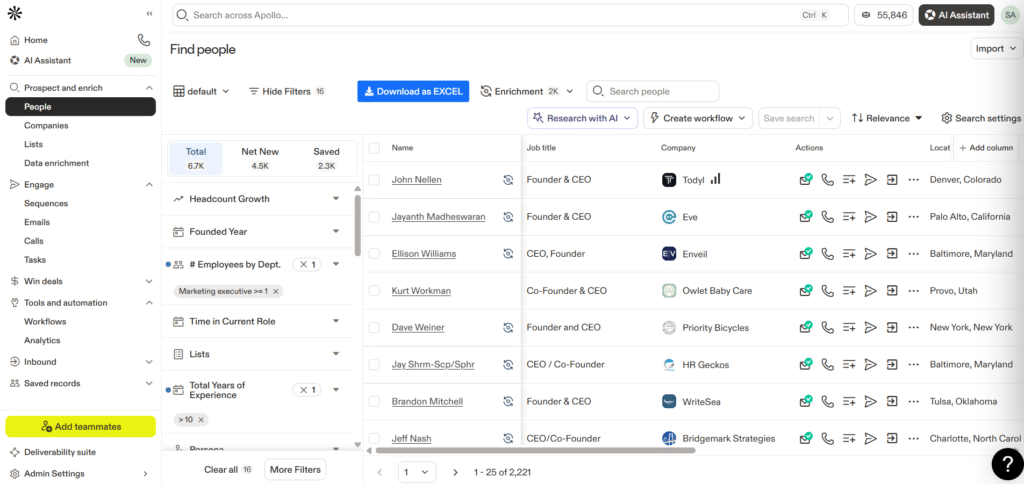
What we saw:
Apollo’s filtering engine is robust and genuinely impressive. You can combine attributes like job titles, intent signals, technologies used, and even engagement data in one go. The interface feels modern and responsive, with plenty of quick filters for fast pivots.
Our experience:
We were able to create a hyper-targeted list of founders and sales leaders in under 10 minutes, without ever needing to export or fiddle with complicated logic. That speed is a real asset when you’re iterating on ICPs.
The only drawback:
Some minor lag when running very large data queries (e.g., filtering over 10M records).
2. Multi-Step Email Sequences & AI Personalization
Rating: 4.5/5

What we saw:
The sequence builder is intuitive and sleek. Setting up outreach steps, adding follow-ups, and injecting AI-driven openers is all in one streamlined panel.
Our experience:
Personalizing at scale was simple, but you do need to review the AI openers carefully, they’re decent. Overall, we felt confident running a 3-step sequence in minutes. Branching logic (like if-open or if-click paths) is still quite basic compared to standalone outreach platforms.
3. Data Health & Enrichment Dashboard
Rating: 4.8/5

What we saw:
The enrichment view is transparent and informative. You get visual breakdowns on job changes, missing emails, credit usage, and overall email health.
Our experience:
Running a large enrichment job on 25,000 contacts was fast and surprisingly smooth. We saw a bounce reduction from 12% down to under 3% after enrichment, a big win for deliverability.
Minor caution:
Occasional outdated job titles, particularly for smaller startups or less active regions.
4. AI Context Center
Rating: 4.4/5

What we saw:
You enter pain points, value propositions, and a CTA, and Apollo’s AI drafts an email. You can preview, tweak, and lock it in seconds.
Our experience:
We found it a strong starting point, especially for teams without in-house copywriters. However, we did end up rephrasing some lines to make them feel more human and less templated.
5. Workflow Templates & Automation
Rating: 4.3/5

What we saw:
Pre-made automation templates simplify common tasks, engaging new hires, reactivating cold leads, following up no-shows.
Our experience:
Templates save serious time and lower the learning curve. They’re great for smaller teams without dedicated ops resources. That said, highly advanced or multi-branch workflows still require manual setup and some creative workarounds.
6. CRM & App Integrations
Rating: 4.9/5

What we saw:
One-click connections with Salesforce, HubSpot, Pipedrive, plus video tools like Zoom and Google Meet.
Our experience:
Sync worked flawlessly. We could push enriched contacts directly into Salesforce with mapped fields, no weird formatting or sync lag. It felt like using a native CRM extension rather than a separate app.
7. Website Visitor Tracking
Rating: 4.2/5

What we saw:
An easy script setup that reveals which companies are visiting your website.
Our experience:
The setup was straightforward (via GTM or manual script). We saw meaningful visitor data from day one, though it’s more high-level (company-level) rather than page-by-page heatmap detail.
8. Buying Signals & Trigger Events
Rating: 4.6/5

What we saw:
Apollo offers pre-built and customizable “signals”, such as recent funding, office expansion, new product launches, or high buying intent. These signals are grouped into momentum, persona, intent, and engagement categories.
Our experience:
We found signals particularly useful for surfacing “hidden” opportunities, like companies going through mergers or users recently promoted (who might have new budgets or needs). You can immediately segment and prioritize these accounts in outreach.
Some signals (like “former champion changed jobs”) are locked behind higher-tier plans (Apollo Deals), and a few signals require careful interpretation to avoid false positives.
9. Overall UI & Navigation
Rating: 4.6/5

What we saw:
Apollo’s layout is sleek and minimal. Everything is grouped logically: Prospecting, Engage, Enrich, Win Deals, and Automate.
Our experience:
Once you learn the structure, it’s fast and fluid. The learning curve is moderate, new users might need a few days to fully unlock all the nuances, especially around advanced enrichment and automation.
Our Final Verdict on Apollo.io
Apollo delivers a true all-in-one sales execution suite experience from data sourcing to enrichment to sending personalized sequences, all under one roof.
Biggest wins: Data enrichment accuracy, CRM integrations, ease of building targeted lead lists.
What to watch: AI content needs light editing; branching logic could be deeper.
ZoomInfo Workflow:
1. Advanced Search & List Building
Rating: 5/5


What we saw:
ZoomInfo’s Advanced Search is extremely granular, allowing you to filter by job title, department, contact info, company size, revenue, technologies used, and more.
Our experience:
We could build highly targeted C-level executive lists at Amazon, Microsoft, and other large organizations in seconds. The ability to layer in buying groups and “likely to engage” filters made it easy to focus on warm, high-intent accounts.
2. Company-Level Targeting


What we saw:
The Companies view gives a massive global database (over 59 million companies), with deep signals like funding events, employee count, revenue, and industry tags.
Our experience:
Perfect for ABM and strategic targeting. We quickly filtered for Fortune 500-sized companies actively hiring or expanding.
3. Scoops: Key Strategic Triggers
What we saw:
“Scoops” deliver real-time updates on company-level activities, such as funding rounds, expansions, executive hires, or M&A.
Our experience:
Filtering for “financial scoops” and recent funding helped us identify prime outreach opportunities, companies ready to invest in new solutions.
4. Intent & Buying Signals
Rating: 5/5


What we saw:
ZoomInfo’s Intent Signals combine intent topics, G2 buyer data, and other online activity to identify companies currently researching or considering new solutions.
Our experience:
We could immediately spot companies experiencing buying surges, supported by audience strength and signal score. The “streaming intent” updates gave us near real-time insight into active interest.
5. Tracker & Contact Monitoring

What we saw:
The Tracker feature continuously monitors contacts for job changes or title updates, automatically keeping your lists fresh.
Our experience:
This was critical for re-engaging champions who moved companies or were promoted, minimizing missed opportunities.
6. Lists & Upload Features

What we saw:
The list upload feature allows you to upload CSV files to match or enrich your data, validate emails, and reduce bounce rates using NeverBounce integration.
Our experience:
We enhanced old prospect lists, filled in missing phone numbers, and verified email health before outreach, significantly reducing bounce rates in our campaign.
7. Copilot & In-Platform Email Composition
Rating: 4/5
What we saw:
The Compose screen supports AI-based value proposition suggestions, offering pain points and benefit prompts to help personalize outreach faster. You can send 500 emails per day.
Our experience:
Copilot-generated content provided a strong first draft but still needed manual polish for a human touch. We loved the integration of Copilot insights directly into the messaging flow.
8. WebSights: Anonymous Visitor Insights
Rating: 4/5
What we saw:
WebSights identifies companies visiting your website and matches them to ZoomInfo’s database.
Our experience:
While detailed page-by-page behavior isn’t shown (unlike a heatmap), we quickly identified new ABM targets and high-value visitors to follow up with immediately.
9. Overall UI & Navigation
Rating: 4/5
What we saw:
The UI is modern but advanced, with interconnected modules for searching, tracking, signals, workflows, and Copilot insights (visible across almost every screen).
Our experience:
A true powerhouse for large sales teams. However, new users should expect a learning curve before mastering all of ZoomInfo’s capabilities.
Our Verdict on ZoomInfo
Strengths:
✅ Best-in-class data coverage and accuracy in North America
✅ Deep signals (Scoops, Intent, WebSights) for advanced targeting
✅ Strong integration with CRM and marketing ops tools
✅ AI Copilot helps craft data-backed messaging
Watch-outs:
⚠️ High annual costs, often starting ~$15k+
⚠️ Complex to onboard
⚠️ Some advanced insights and signals behind higher pricing tiers
Pricing Models: Cost Transparency, Value, and Contract Flexibility


As you can see on the pricing page, ZoomInfo doesn’t actually display any specific pricing details. To get exact costs, you’re required to submit your email and book a meeting with their sales team.
In contrast, Apollo.io lists all pricing plans openly, with clear feature breakdowns and monthly or annual billing options, making it far easier to compare, budget, and get started without the back-and-forth.
In the sections below, we’ll break down both platforms in terms of:
- Pricing structure
- Cost transparency
- Value for money
- Contract flexibility
1. Pricing Structure
| Factor | Apollo.io | ZoomInfo |
| Model | Transparent, tiered (Free to Enterprise) | Custom pricing, not public |
| Entry Price | Starts at $49/user/month (Basic Annual) | Starts at ~$14,995/year (Professional) |
| Free Plan | Generous free tier with limits | 2-day Lite trial, highly limited |
| Add-Ons | Extra credits at $0.025/credit | High-priced premium add-ons |
2. Cost Transparency
| Apollo.io | ZoomInfo |
| Public pricing, visible tiers | Opaque; must speak with sales |
| Simple evaluation and comparison | High negotiation burden; potential over-purchasing |
3. Value for Money
| Apollo.io | ZoomInfo |
| High ROI for SMBs; automation + CRM in one | High ROI for large enterprises |
| AI tools, email outreach, and free plan flexibility | Better US data accuracy, intent data, and organizational charts |
| Some issues with data quality and limited phone capabilities in lower plans | Costly for SMBs, questionable global data quality |
4. Contract Flexibility
| Apollo.io | ZoomInfo |
| Monthly & annual options; 14-day free trial | Annual only; strict terms |
| Easy cancellation for monthly users | Renewal is difficult for small teams |
| Issues reported with chatbot-based cancellation | Requires skilled negotiation to manage scope & cost |
5. Total Cost of Ownership (TCO) for 12 Months
| Team Size | Apollo.io (Annual) | ZoomInfo (Est. Annual) |
| 1 User | $588 (Basic Plan) | ~$15,000 |
| 5 Users | $4,740 (Professional) | ~$22,500 |
| 10 Users | $14,280 (Organization) | ~$45,000 |
| 50 Users | ~$50,000 (Enterprise est.) | $100,000+ |
6. Onboarding & Support
| Apollo.io | ZoomInfo |
| Free & low-cost onboarding ($0–$5,000) | Expensive onboarding ($2,000–$20,000) |
| Mixed support feedback | Strong support for high-tier plans |
| Email & chatbot-based support (issues reported) | Live chat, dedicated reps for Elite users |
7. ROI & Performance
| Apollo.io | ZoomInfo |
| 75% increase in meetings booked (per case studies) | 60% of deals attributed to ZoomInfo data (enterprise) |
| Strong for sales velocity via automation | Stronger lead quality & precision targeting |
| May require manual data cleanup | US data is highly accurate; issues with Asia/non-US data |
Apollo & ZoomInfo Alternatives
Based on our verdict, if neither Apollo nor ZoomInfo feels like the right fit for your team, there are other tools that may better align with your size, budget, or go-to-market motion.
Here are a few strong alternatives worth exploring:
1. Lusha
Best for: B2B teams focused on quick, contact-level prospecting with solid LinkedIn integration.
Pros: Easy-to-use Chrome extension, fast contact discovery, simple team onboarding.
Cons: Limited intent data and enrichment depth; primarily focused on phone/email contacts.
2. UpLead
Best for: Teams that need verified B2B contacts with real-time email validation.
Pros: Built-in email verifier, no contract required, high data accuracy claims.
Cons: Smaller database compared to ZoomInfo or Apollo; fewer workflow automation features.
3. RocketReach
Best for: Individual users or small teams focused on direct contact discovery.
Pros: Easy UI, accurate contact info, pay-as-you-go plans.
Cons: No sales engagement tools or CRM-level integrations.
Curious how these stack up against Apollo? Check out our full Apollo.io alternatives guide for deeper insights.
Choose Wisely
You’ve seen the data, tested workflows, pricing clarity, and campaign performance side by side.
Now it comes down to what fits your team best, your goals, your motion, and your budget.
There’s no one-size-fits-all here.
Some teams need control and scale. Others need speed and simplicity.
So make the call that works for you.
FAQs
1. Which tool is more accurate for international data?
ZoomInfo performs better in North America. For international leads, both platforms show gaps, especially in emerging markets.
2. Can Apollo truly replace ZoomInfo for outbound?
Yes, for SMBs and growth-stage teams. If your outreach is email-heavy and you’re not doing complex ABM or hiring workflows, Apollo can cover most needs.
3. Is ZoomInfo worth the premium cost?
For enterprise teams running ABM or recruiting across departments, yes. For small teams or email-first outbound, it’s likely overkill.
4. Can Apollo integrate well with Salesforce or HubSpot?
Yes. Apollo offers strong native integrations with both, with fast sync, custom field mapping, and minimal setup.
